How Developers Use the Open Connector
See how an AI coding agent can use Descrybe Legal Engine tools inside a custom legal application.
You will understand what the Open Connector provides, how a coding agent works with it, and where the human user fits.
The short version
The Descrybe Open Connector is the build-your-own-tools path to Descrybe Legal Engine. A developer—or a person working with an AI coding agent—can use it to build an app, script, local agent, or firm tool around Descrybe’s legal research tools.
The Open Connector handles the connection to Descrybe. The application decides what the user can do with the returned legal information.
Give the coding agent a reliable starting point
The easiest way to begin is to give the coding agent the Open Connector repository and describe the smallest useful thing you want to build. The repository contains the current setup instructions, public tool reference, and examples the agent needs to inspect before changing files.
You do not need to translate your idea into a complete technical specification first. You can say what the user should be able to do, ask the agent to start with one small working step, and test the result before adding more.
The app can call focused legal research tools
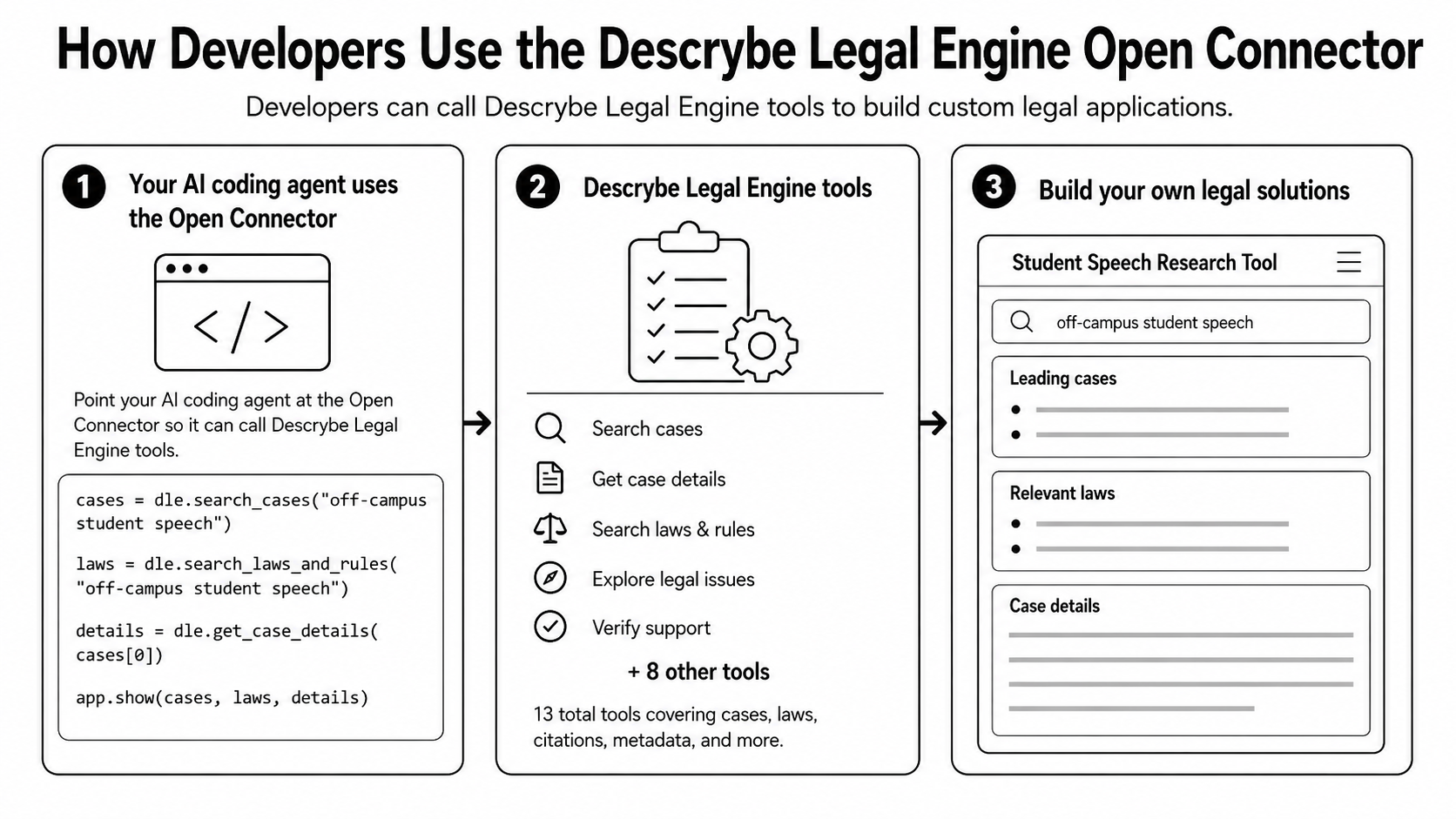
Descrybe Legal Engine provides separate tools for separate jobs. An application can search cases, retrieve case details, search laws and rules, explore legal issues, verify support, resolve citations, retrieve source material, and perform other focused research tasks.
The code shown in the graphic is intentionally simplified. In a real project, the coding agent should follow the current repository instructions and use the public client and tool interfaces described there.
Keeping the tools separate gives the application control over the workflow. It can run only the searches it needs, show intermediate results, ask the user for another fact, or let the user open a source before moving on.
The example app follows the same student-speech question
The graphic shows a small student speech research tool. A user can enter the off-campus speech question, see leading cases and relevant laws, then open case details.
That is one possible interface. The same building blocks could support a brief checker, a citation-review tool, a focused research dashboard, a local script, or another application designed around a particular legal task.
Each user connects their own Descrybe account
The Open Connector handles the Descrybe side of authentication for you. Authentication is simply the process of confirming who a person is and connecting the application to that person’s Descrybe account.
Each person signs in to Descrybe and approves the connection without giving their password to the application. If more than one person will use the app, the app still needs to identify its own users and keep each person’s Descrybe connection separate and secure.
A working prototype is the beginning
A coding agent can help someone move from an idea to a working proof of concept quickly. That does not make the result ready for confidential information, real clients, or unsupervised legal work.
Before a tool is used in production, it needs deliberate decisions about data storage, security, logging, testing, errors, user permissions, and source review. The Open Connector handles the Descrybe account connection and supplies the legal research tools; it does not make the rest of those product decisions for you.