How AI Assistants Use Descrybe Legal Engine
Follow a legal question from the conversation to research tools, structured results, and a source-grounded answer.
You will see how an assistant can break one legal question into smaller research jobs and use Descrybe to find material for the answer.
The short version
Claude or ChatGPT provides the conversation. Descrybe Legal Engine provides legal research tools and structured legal information underneath it.
When a question needs legal research, the assistant can make one or more tool requests, review what Descrybe returns, and use that material to build an answer with authorities and source links.
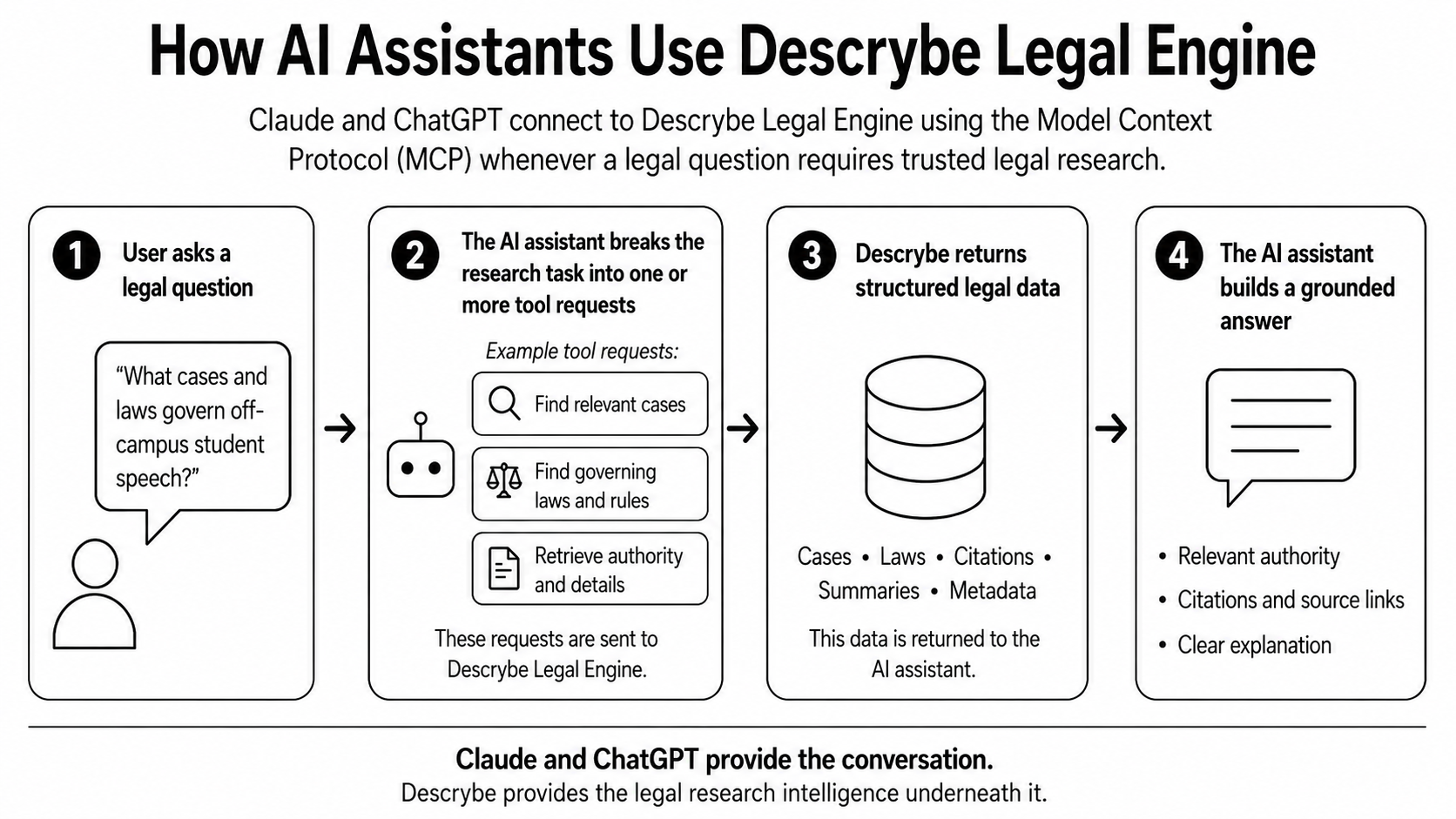
One question can contain several research jobs
The graphics follow one question about off-campus student speech so you can see the same example move through the system. It is only an example. The same basic process can be used for many kinds of legal research.
A person asks, “What cases and laws govern off-campus student speech?” The assistant does not have to send that entire sentence to one all-purpose search. It can break the question into smaller jobs.
- 1Find cases about students disciplined for speech away from school.
- 2Find statutes, regulations, or school rules that may apply.
- 3Retrieve the most relevant authorities and their details.
- 4Check whether later cases have affected those authorities.
- 5Use the returned sources to explain the answer.
Other questions can break down differently
There is no single hidden checklist. The assistant chooses research steps that fit the question and may change direction after seeing the first results.
Source support
“Does this case support the sentence in my brief?”
The assistant might identify the case, retrieve the opinion and relevant passages, compare them with the sentence, check the case’s treatment, and explain where the support is strong or incomplete.
- Identify the case from its citation.
- Find the relevant language in the opinion.
- Compare the source with the statement in the brief.
- Check whether later authority affects the case.
Rules and cases
“What notice is required before ending a month-to-month tenancy?”
The assistant might first identify the jurisdiction, then search the governing statutes and court rules, find cases interpreting those requirements, and retrieve the language the user needs to inspect.
- Confirm the jurisdiction and type of tenancy.
- Find the governing law and procedural rules.
- Look for cases interpreting the notice requirement.
- Return the relevant text and source links.
Enforceability
“Can an employer enforce this noncompete agreement?”
The assistant might ask where the employee works, search the current statutes and cases for that jurisdiction, identify exceptions, and retrieve authorities that address agreements like the one in question.
- Clarify the jurisdiction and relevant facts.
- Find current statutes and controlling cases.
- Look for exceptions or recent changes.
- Bring the strongest authorities back for review.
Who does what
- You supply the question, jurisdiction, facts, and practical goal.
- The assistant manages the conversation and decides which research requests may help.
- Descrybe searches and returns cases, laws, citations, summaries, metadata, passages, and source links.
- The assistant organizes that material into an explanation.
- You inspect the important sources and decide what the research supports.
A source-grounded answer is still an answer to check
A source-grounded answer is tied to legal material returned during the research. That is much more useful than an answer that offers no path back to authority.
It is not a promise that every answer is correct. The assistant can misunderstand a fact, choose the wrong source, miss a limit, or explain the law too broadly. Citations and source links make those problems easier to spot because the user can check the work.